Run your next cohort
on Taylormade Academy.
A cohort is a group of people who start together and learn together. We give yours one home: sign-up, a live class room, every class recorded, team spaces, and one screen for the person running it all. Your name and ours on the door.
At a glance
Taught live.
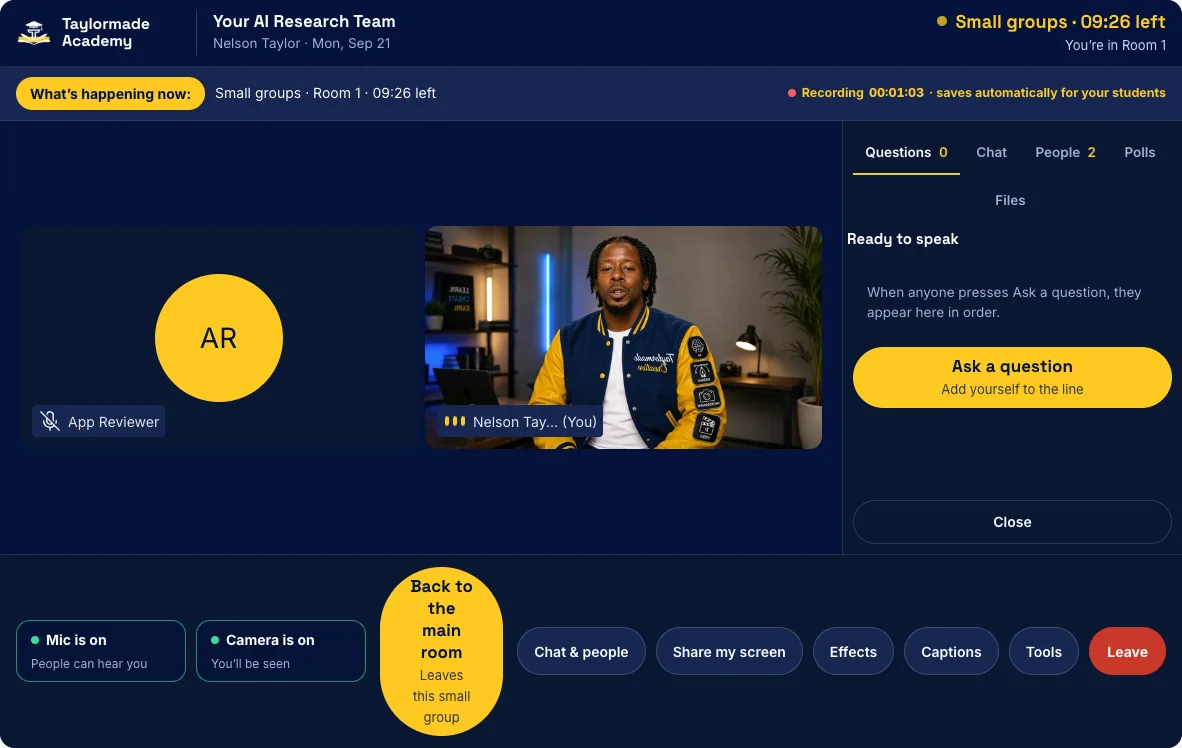
Classes happen in a room that opens in the browser. Nothing to download. Sign in and you are in.
Kept for good.
Every class records itself and turns into a replay with chapters, a transcript and the class files.
Open all year.
Teams keep working between classes: their own chat, files, meeting room and showcase page.
Live nowThe Atlanta University Center Data Science Initiative runs its Open Payments Innovation Lab on this platform: 13 student teams, live classes through the school year.
Everything a cohort needs, in one place.
Most programs piece this together from five or six different tools. Here it is one sign-in, and the person running the program never needs a developer.
A home with your name on it
Your logo beside ours, your colors, and your own address on the site, like taylormadeacademy.com/yourschool. It installs on a phone like an app, straight from the browser. No app store.
Sign-up that sorts itself
People apply on your page. Your coordinator approves each one with a tap. Someone joins late? Send a one-time invite link.
A live class room
Cameras, chat, polls and screen sharing for everyone. A question line where you bring people “on stage.” Small groups with a timer, a whiteboard, class files and live captions.
Every class becomes a replay
The room records itself. Each replay gets chapters, a transcript and the files from class. Your coordinator looks it over, then publishes it.
Teams that keep working
Each team gets a page, a chat, a locker for files and checkpoints, and its own room to meet in. Judges score pitches on a leaderboard, and each team can have a public showcase page.
One screen for the coordinator
The roster, approvals, sessions, materials and attendance in one place. Calendar invites, a reminder email 30 minutes before class, and a “Need help?” button that reaches your team.


One hub. Every office.
The same platform can carry a whole university. Each office that wants one gets its own space, all behind one sign-in, and it installs on a phone as your campus app.
One place in place of many subscriptions
A lot of campuses pay for an events app, a webinar tool, a community app and a phone app, one bill each. A hub puts them under one roof.
Events app→A campus calendar with add-to-calendarWebinar tool→The live room, for any officeCommunity app→Feeds, messages and team spacesPhone app→Installs from the browser
Beside your LMS, never against it
Your LMS (learning management system) holds grades and credit. The hub sits next to it and does not replace it. It is where people meet, learn live and stay connected.
Spaces we build. Pick the ones you need. Each one is its own page in the hub, in your colors, with that office’s events and updates.
- AdvancementDonor updates and ways to give
- President’s officeTown halls and campus updates
- EventsThe campus calendar, in one spot
- LearnWorkshops and short courses, like AI literacy
- StudentsStudent life and announcements
- CareerWorkshops, employers, office hours
- AlumniAn alumni track and reunions
- AdmissionsInfo sessions for families
- OutreachCommunity programs
- BoardTrustee materials in one place
- CommunityA feed and messages
- ShowcaseStudent work, shown publicly
Your school × Taylormade Academy
Your name on it. A partnership by default: your brand out front, our platform underneath, both names on the door. Carrying your name alone is an option too.
From a first call to a first class.
- 1
Talk
A 20-minute call. Who is in the program, how many people, and how often you meet.
- 2
Plan
A written plan: the sessions, the spaces, and who teaches.
- 3
Set up
We build your space, bring in your brand and roster, and train your coordinators.
- 4
Go live
First class. Every class after that lands in your library.
A cohort program
A season or a school year of live classes, with the hub around it.
A campus hub
Spaces for the offices you choose, open all year.
We teach, or you do
Nelson teaches AI, design, photo and video. Or your own people run classes in the room, and he trains them.
About pricing. We set it after the call, based on how many people, how many live classes, and who teaches.

Nelson Taylor
Founder, Taylormade Academy · Creative director, Taylormade Creative · Dallas–Fort Worth
Fourteen years directing real work for brands and businesses, with AI now part of how his studio runs every day. He runs the Open Payments Innovation Lab for Atlanta University Center students on this platform. In June 2026 he facilitated the Johns Hopkins-funded AI agent workshop for the AUC Data Science Initiative, and he runs public AI workshops for business owners.
Let’s talk about your program.
Tell us about your group. We will bring a plan to the call. Sending this to someone? The PDF is four pages and prints clean.